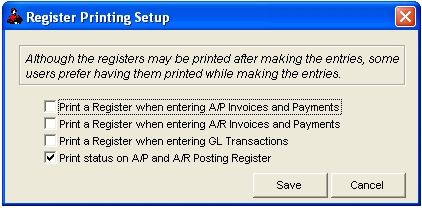
Posting Registers Print Options
Select File - Setup Options - Register Options
Lets you dictate how and when varios posting regiters are printed.
Default settings are set not to print when posting in Accounts Payable, Accounts Receivable or the Transactions file. Changing the default values to print registers would require additional paper. If you select “Yes” print Accounts Payable, the Daily Accounts Payable Invoice Register and the Daily Accounts Payable Application Register (for manual Accounts Payable checks) will be printed. If you select “Yes” print Accounts Receivable, the Daily Accounts Receivable Invoice Register, the Accounts Receivable Daily Application Register (for manual payments), and Accounts Receivable Service Charges Application Register will print. If you select “Yes” print general ledger transactions, each debit and credit posting will be printed when entering transactions in the Transaction file.
You can print the Accounts Payable Posting Register, Accounts Receivable Posting Register and the Transactions report for specified dates and or applications at any time during the month and save lots of paper. Default setting is to print status on Accounts Payable and Accounts Receivable Posting Registers. Status is picked up from the Transaction file for period posting registers. The status is picked up from the Year to Date Transaction file for Accounts Payable and Accounts Receivable year to date posting registers.
Roughneck Help System 02/15/07 10:30 am Copyright © 2006, Roughneck Systems Inc.